
TopMail Permission Manager
Microsoft 365 Permission Manager: Your Governance, Risk & Compliance (GRC) service for Microsoft 365
Microsoft 365 simplifies collaboration and enables location-independent access to company documents and data. At the same time, the number of file and document sharing permissions within organizations is increasing rapidly.
It is becoming increasingly difficult for administrators to maintain an overview of permission management and ensure compliance with Microsoft 365 requirements.
With conova TopMail Permission Manager, you gain complete overview of your file permissions for internal and external users in Microsoft 365 (SharePoint, OneDrive, Microsoft Teams, Groups).
The specially developed solution enables administrators to define, enforce and continuously monitor compliance policies for the sharing of sites, files and folders. This ensures secure and compliant SharePoint, Teams and OneDrive infrastructure across your organization.

ADVANTAGES
- Automated compliance checks
- Daily reports for administrators regarding newly created sharing links
- Automatic removal of permissions or immediate notification of site owners in the event of policy violations
- Complete logging of all activities for audits and compliance verification
- Time savings with automation and bulk actions
- Alerts for critical permission alterations
- User-friendly interface
INCREASE M365 COMPLIANCE
TopMail Permission Manager helps you sustainably improve the security and compliance of your Microsoft 365 environment. Administrators gain centralized overview of all sharing permissions granted across SharePoint, OneDrive and Microsoft Teams and can also easily define and deploy policies for both external and internal sharing.
In the event of violations of defined compliance policies, administrators are automatically notified and can take immediate action. This significantly reduces the risk of data leaks and uncontrolled access.
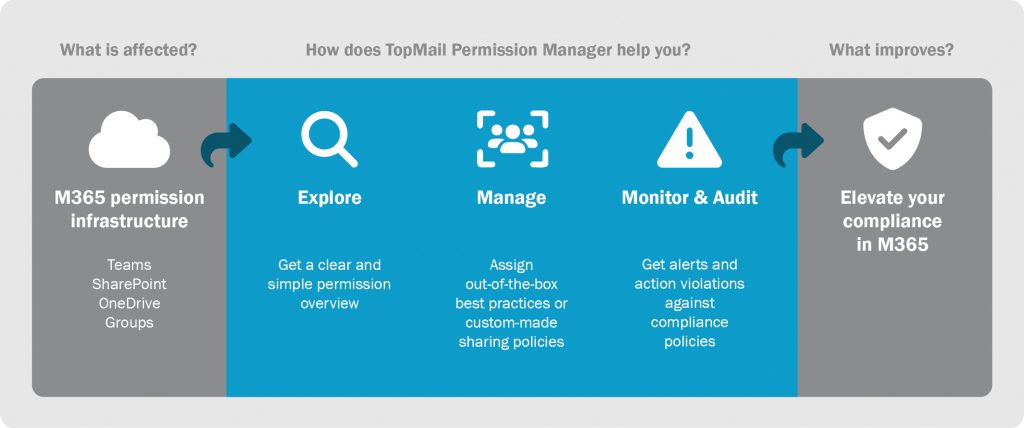
Bulk actions and automation help modify permissions for multiple sites simultaneously or define a general access level for external sharing. For example, this includes restrictions on anonymous access, time-limited sharing and continuous permission monitoring.
Detailed reports provide full transparency into existing permissions, which files are shared with guests and which content can be accessed by anonymous external users. This creates a solid foundation for audits and documentation purposes.
| TopMail Permission Manager | Set-up costs (one-time expense) | Monthly operations per user |
| upon request | upon request |
Notes:
• The initial order specifies the minimum number of users. Any additional users will be billed on a variable basis.
• In order to use TopMail Permission Manager, a Microsoft Cloud license with SharePoint, OneDrive and/or Teams functionality is required.
• Conveniently source your Microsoft licenses (CSP, SPLA, etc.) directly via conova. As a Microsoft Cloud Solution Provider Direct (Tier 1), we offer highly competitive conditions for your CSP licenses and fully automated, dynamic billing based on actual usage.
Contract details:
• Minimum contract period 36 months.
• Errors and changes reserved.
Powered by:

The most frequently asked questions regarding Microsoft 365 permission management
What is permission management in Microsoft 365?
Permission management in Microsoft 365 includes the administration and control of access rights to files, folders and sites in applications such as SharePoint, OneDrive and Microsoft Teams. The goal is to ensure that only authorized users have access to sensitive data and that compliance requirements are met. Structured permission management reduces security and prevents uncontrolled data sharing.
Why does a Microsoft 365 Permission Manager make sense to have?
A Microsoft 365 Permission Manager such as conova’s TopMail Permission Manager helps companies maintain visibility over complex permission structures. Manual controls quickly reach their limits, particularly in environments with a large number of external shares and extensive volumes of data. Automated solutions enable the monitoring of sharing activities, enforcement of policies and rapid response to security risks – making a significant contribution to improving compliance and data security.
How can external sharing in Microsoft 365 be managed securely?
External sharing in Microsoft 365 can be securely managed with conova’s TopMail Permission Manager by defining clear policies, reviewing them regularly and enforcing them automatically. For example, this includes restrictions on anonymous access, time-limited sharing and continuous permission monitoring. Permission management tools such as TopMail Permission Manager help companies identify risks at an early stage and automatically prevent unwanted access.